

To book the SwimSafer test in Singapore, your child needs a SwimSafer CAMS account. CAMS is the official SwimSafer assessment platform run by Singapore Aquatics at saqswimsg.org.sg. This guide shows you how to create a CAMS account step by step, with real screenshots, then how to tag your coach and book the test.
Before you start: what you need
- Your child’s full legal name, date of birth and NRIC/FIN, exactly as on their official ID
- An email address you can open. One email per child: CAMS allows one participant per email, so siblings each need their own
- The name of your child’s SwimSafer coach or swim school, so you can tag them after creating the account
How to create a SwimSafer CAMS account: step by step
Step 1: Go to the CAMS portal
Open the official CAMS portal at https://saqswimsg.org.sg/home/. Use only this address: some other websites use similar names.
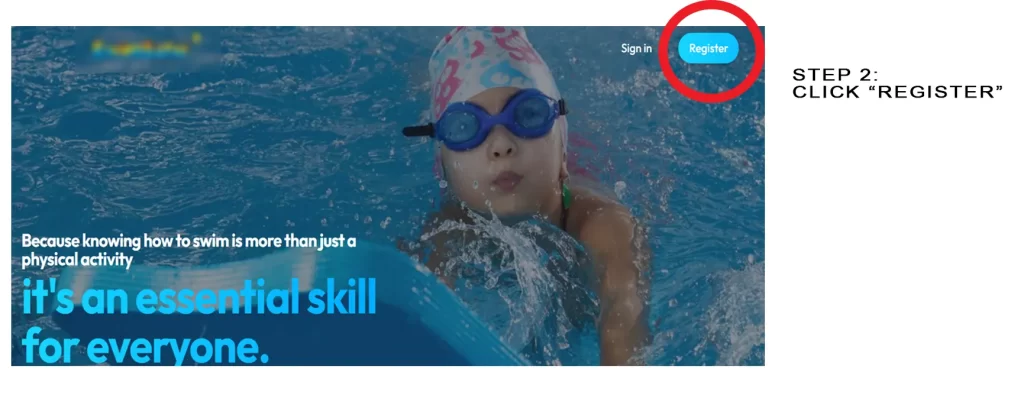
Step 2: Click “Register”
The Register button is at the top right of the page.
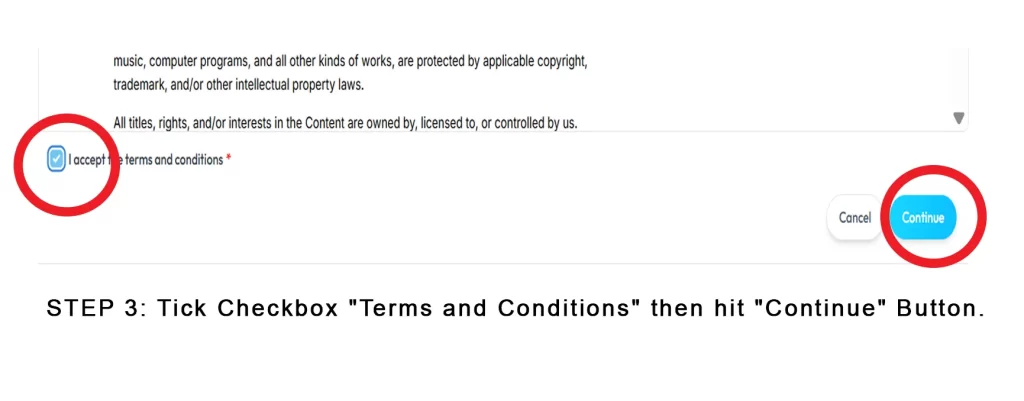
Step 3: Accept the terms and conditions
Tick the Terms and Conditions checkbox, then click Continue.
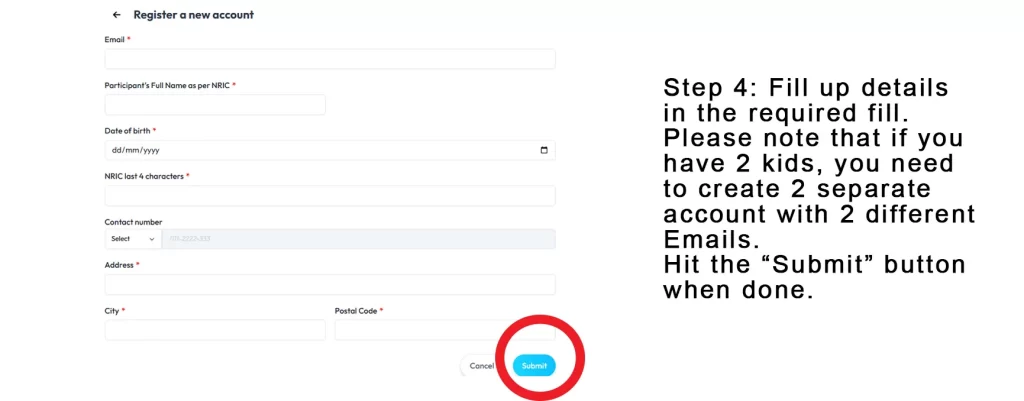
Step 4: Fill in your child’s details
Enter the swimmer’s full legal name (not the parent’s name), date of birth and a valid email address, then create a password.
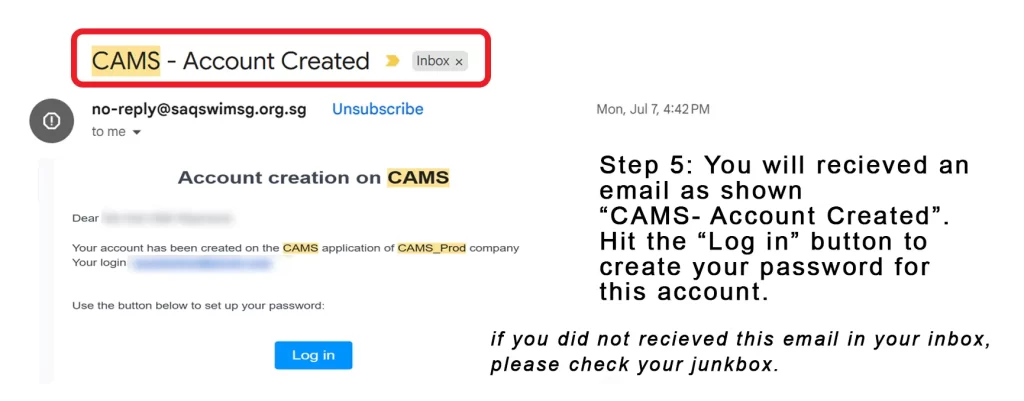
Step 5: Verify your email
CAMS sends a verification email. Click the link in it to confirm the account. If it hasn’t arrived within a few minutes, check your spam or junk folder.
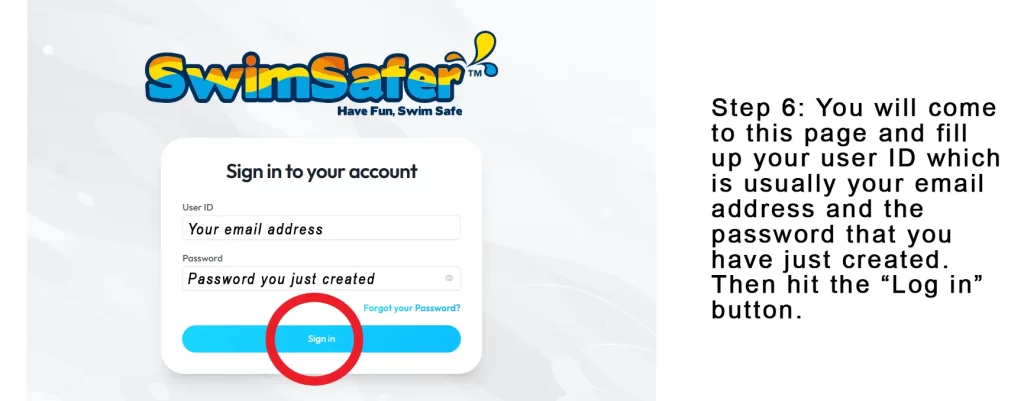
Step 6: Log in to your CAMS account
Go back to the CAMS login page and log in with the email and password you created.
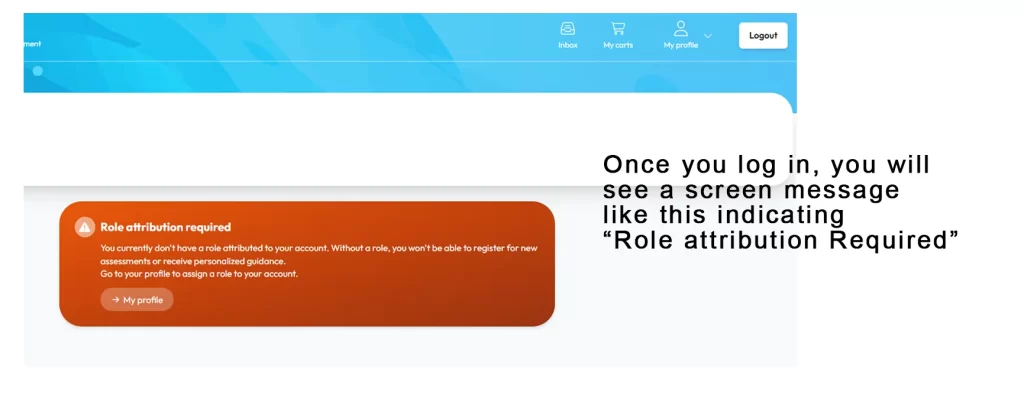
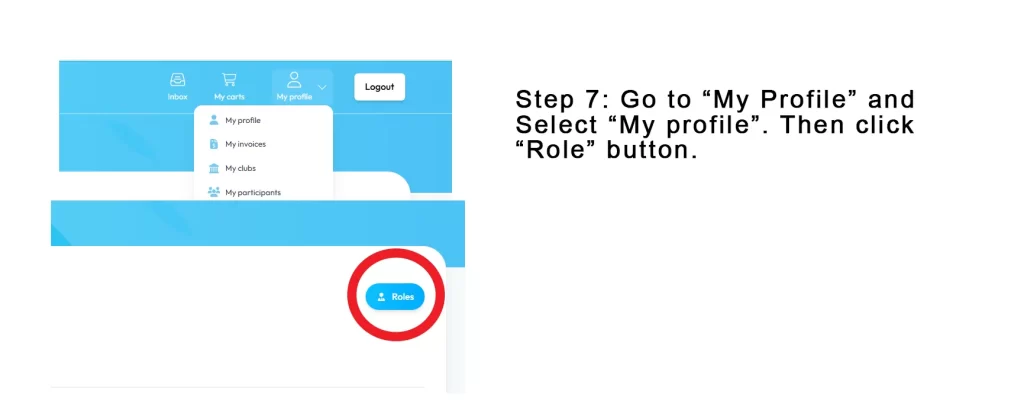
Step 7: Open My Profile, then Roles
Select My Profile, then click the Roles button.
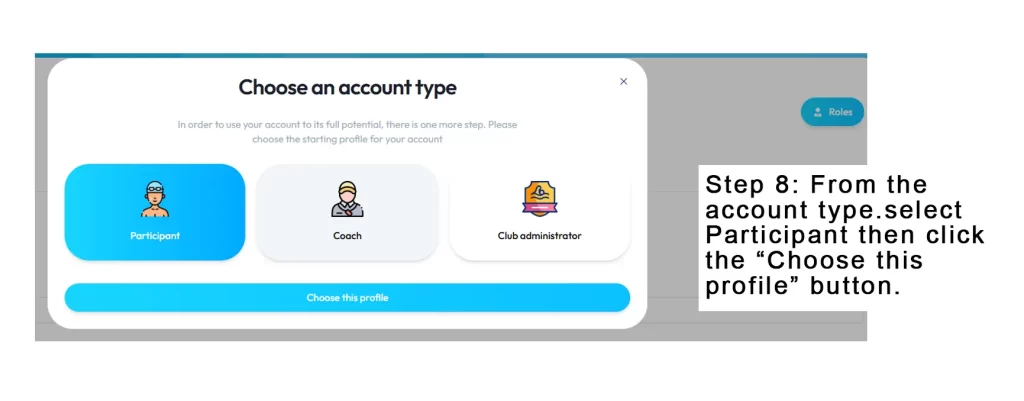
Step 8: Choose the “Participant” profile
Under Account type, select Participant and click Choose this profile. Your child’s CAMS account is now created.
After creating the account: tag your coach
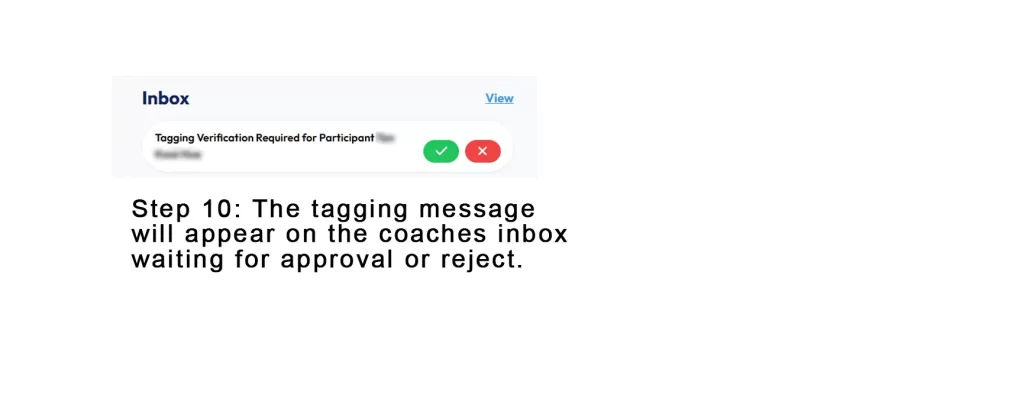
Creating the account alone does not let you book a test. Your child must be tagged to a SwimSafer coach or swim school, and the coach must approve it first.
Step 9: Find your coach or swim school
You will see the screen for linking to a coach or swim school.
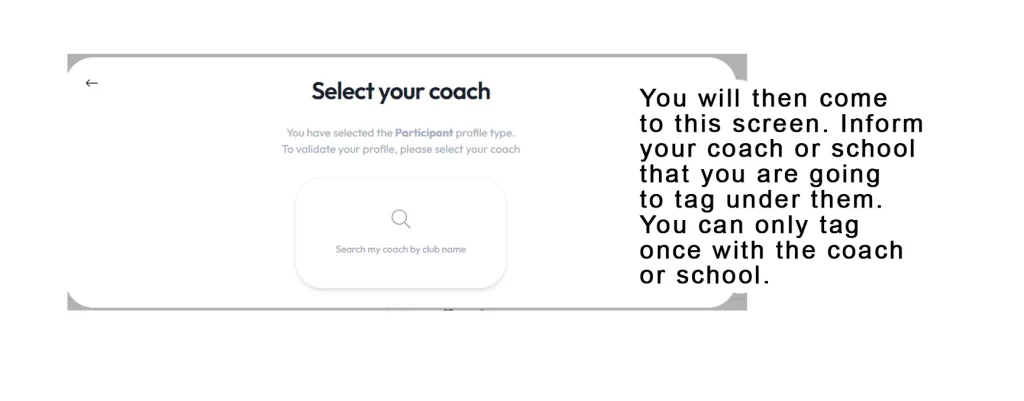
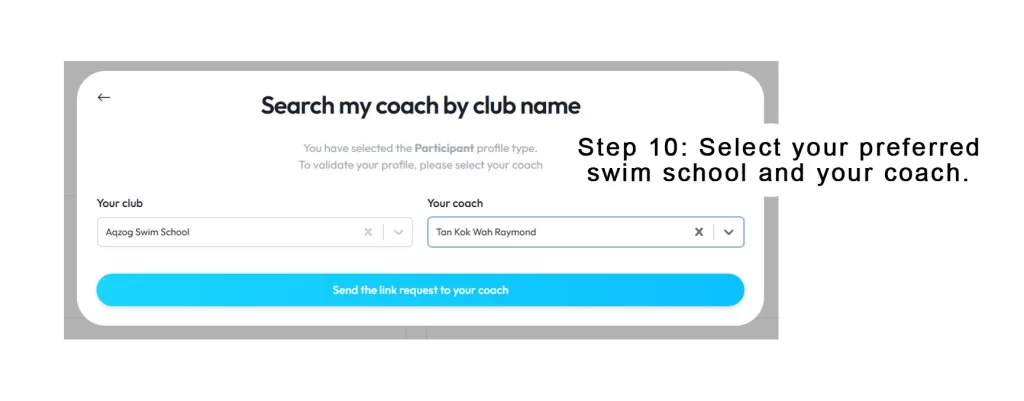
Step 10: Send the link request
Select your swim school and coach. For AQZOG, select AQZOG Swim School and your coach, then click Send the link request to your coach. Then tell your coach you have sent it: AQZOG families can WhatsApp 9137 5141. If the coach doesn’t know who you are, they may not approve the request.
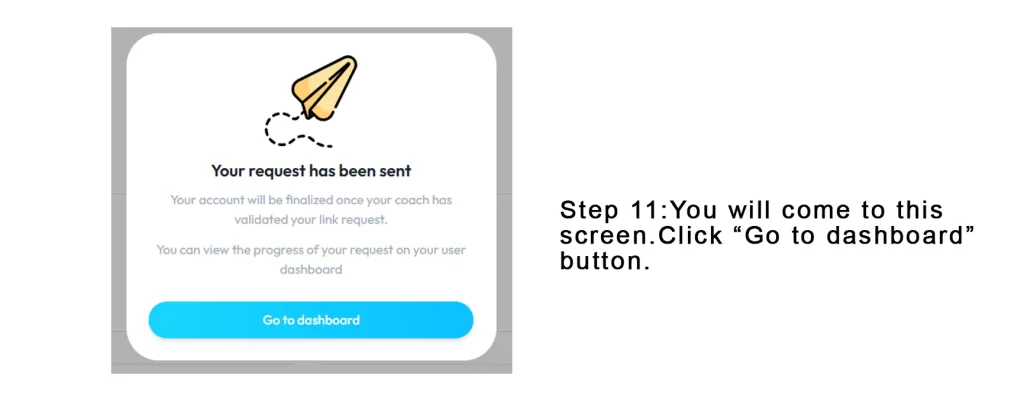
Step 11: Go to the dashboard
Click Go to dashboard. Send the link request only once: do not resend it.
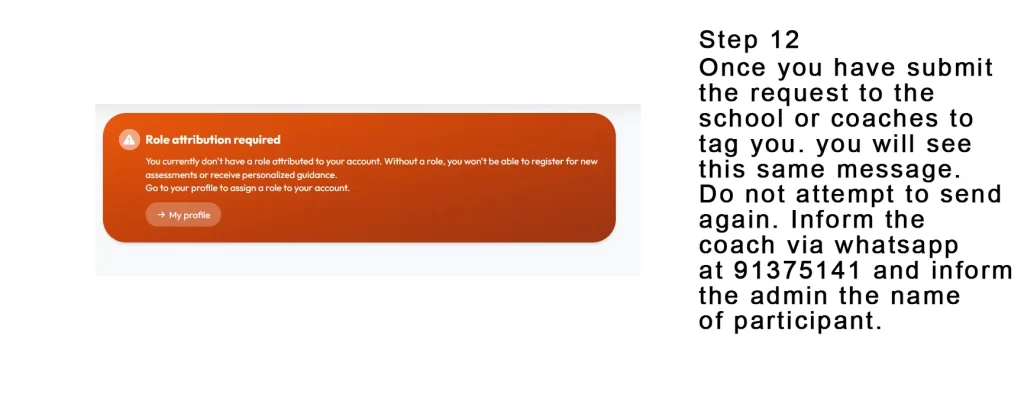
Step 12: Wait for your coach to approve
Until the coach approves, your dashboard looks like this. Allow at least 24 hours: coaches are often in the pool. Don’t resend the request; just remind your coach.
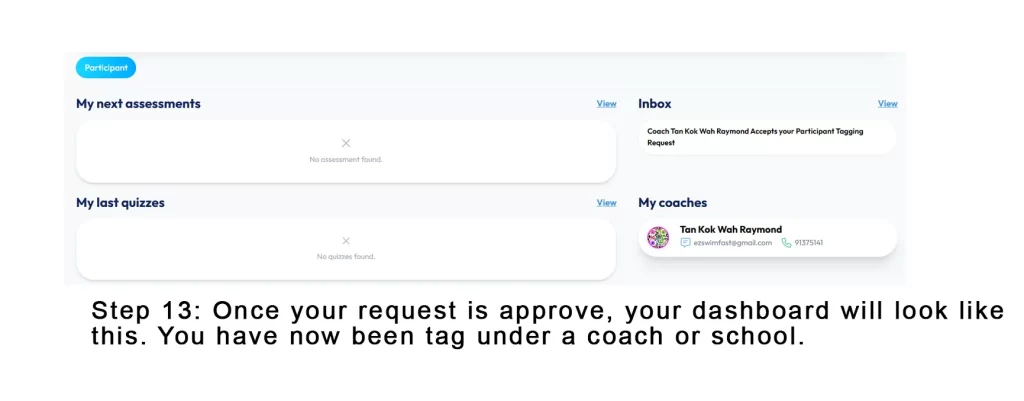
Step 13: Approved and ready to book
When the dashboard looks like this, your coach or swim school has approved the link and you can register for a SwimSafer test. If it still looks like Step 12 after a day or two, ask your coach to check.
Tag under AQZOG and we’ll handle the rest
Once your child’s CAMS account is ready, tag AQZOG Swim School as your coach. We validate your link request, help you book a test slot, and the total is S$80 per swimmer at any test centre. Not sure your child is ready? Try a SwimSafer mock test first.
WhatsApp 9137 5141Book a SwimSafer mock testWhich stage? Free checker
Booking the SwimSafer test in CAMS
- Test slots open weekly in CAMS, up to 3 months ahead
- Registration and payment close 3 weeks before the test date, so book early
- Every registration is validated by the coach your child is tagged to
- The SwimSafer theory quiz opens in CAMS after you register for the practical test, and needs 90% to pass
- With AQZOG, the total is S$80 per swimmer at any test centre (S$30 validation and S$50 test fee). See the 5 SwimSafer test centres
Common mistakes when creating a CAMS account
- Using the parent’s name instead of the child’s full legal name
- Using one email for several children: each child needs their own
- A name, NRIC/FIN or date of birth that doesn’t match the child’s ID exactly
- Not clicking the verification link in the email
- Choosing the wrong profile: it must be Participant
- Sending the coach link request many times, or not telling the coach about it
- Missing the booking cut-off 3 weeks before the test
Frequently asked questions
How do I create a SwimSafer CAMS account?
Go to saqswimsg.org.sg, click Register, accept the terms, enter your child’s full legal name, date of birth and an email, verify the email, log in, then go to My Profile, Roles and choose Participant. Then tag your child’s coach or swim school.
Can I use one CAMS account for all my children?
No. CAMS allows one participant per email address, so each child needs their own account with a different email.
Should I use my name or my child’s name?
Use your child’s full legal name, exactly as on their NRIC/FIN or birth certificate. The account is for the swimmer.
I created the account. Why can’t I book the test?
Your child must be tagged to a SwimSafer coach or swim school, and the coach must approve the link request before you can register for a test.
How long does coach approval take?
Usually within a day or two. Allow at least 24 hours and remind your coach; don’t resend the request.
Does CAMS use Singpass?
CAMS is moving from email login to Singpass, with children’s accounts managed under a parent’s Singpass. Make sure your child’s name, NRIC/FIN and date of birth in My Profile match their ID.
How much does the SwimSafer test cost with AQZOG?
S$80 per swimmer at any test centre: S$30 validation and S$50 test fee.
Need help? WhatsApp AQZOG Swim School at 9137 5141, or read our full SwimSafer CAMS guide.